
Cat Desk Accessories: A Purr-fect Buyer's Guide

Your coffee's cooling, your next call is about to start, and your cat has decided the keyboard is premium seating. Meanwhile, that adorable cat lamp in your shopping cart looks perfect, but will it crowd the screen, wobble under a curious paw, or leave another tempting cord dangling?
The best cat desk accessories earn their space. They organize something, improve your setup, or add personality without creating a new hazard. Floofie, our feline mascot and honorary desk inspector, welcomes you with a purr and a firm recommendation: buy for the job first, then choose the whiskers. 🐾
Cat Desk Accessories at a Glance
Cat desk accessory types at a glance
| Accessory | Main job | Best for | Cat-safety check |
|---|---|---|---|
| Cat figurine or desk ornament | Decor | Quick personality boost | Keep small parts out of paw reach |
| Cat pen holder | Organizes pens and tools | Daily writing desks | Choose a tall, weighted base that resists tipping |
| Cat mouse pad | Mouse surface and style | Gamers and designers | Look for a non-slip base and washable cover |
| Cable organizer | Routes and secures cords | Tidy workstations | Route cords out of reach and secure them so cats have less access to chew them |
| Cat-shaped desk lamp | Task lighting | Late-night work | Choose a heavy base and a shade that stays cool |
| Monitor riser or shelf | Raises screen and stores items | Small desks | Check that the screen sits at eye level |
| Cat calendar or planner | Scheduling and notes | Home offices | Choose a lightweight design without loose parts |
Choose the accessory that solves your most annoying desk problem. If charging cables keep slipping to the floor, start with a cable organizer. If pens vanish beneath paperwork, a stable cat pen holder will do more for you than another ornament.
Decorative pieces have their place. A figurine in a visible corner can personalize a plain workstation, while a cat calendar adds character without becoming an object you constantly move. Keep decor on a shelf or quiet corner, clear of your working area.
Decorative or hardworking
Functional accessories need to do their job every day. A mouse pad should track smoothly, a lamp should illuminate your notes, and a riser should fit your display and the equipment beneath it. A cute face cannot make up for a slippery backing or an awkward power button.
Decorative accessories should look good without getting in the way. Choose a solid silhouette over projecting whiskers, dangling charms, or detachable miniature props if your cat can reach the display.
Floofie's buying rule: Give every piece a job, even if that job is making an empty corner delightful.
Matching sets need extra scrutiny. Buy a bundle only if you have a place and purpose for every component, from the pen cup to the figurine. In a shared human-and-cat workspace, check each piece for stability, reachable cords, and anything that could obstruct the screen before you bring it home. Purr-sonality belongs on the desk. Unnecessary obstacles do not. 🐱
Choosing by Decor Style and Daily Function
Decor styles and the desk pieces that suit them
| Decor style | Look | Pairs best with | Sample pick |
|---|---|---|---|
| Minimalist | Clean line-art cats in neutral tones | Matte white or light wood desks | Single cat figurine |
| Playful | Bright colors, cartoon cats and puns | Colorful stationery and tech | Pun pen holder |
| Vintage | Muted retro prints and old-style illustrations | Leather or walnut desks | Retro cat calendar |
| Cozy | Soft plush, felt and warm textures | Warm-white lamp and fabric accessories | Plush cat mouse pad |
| Sleek tech | Metal finishes and LED accents | Monitor stands and dark desks | LED cat desk lamp |
Let your existing desk guide the finish. A neutral line-art cat looks intentional beside pale wood, while a bright cartoon pen holder fits a setup already full of colorful notebooks. A retro calendar is an easier companion for walnut and leather than a glowing novelty lamp.
Use this visual guide to compare the overall mood before choosing individual pieces.
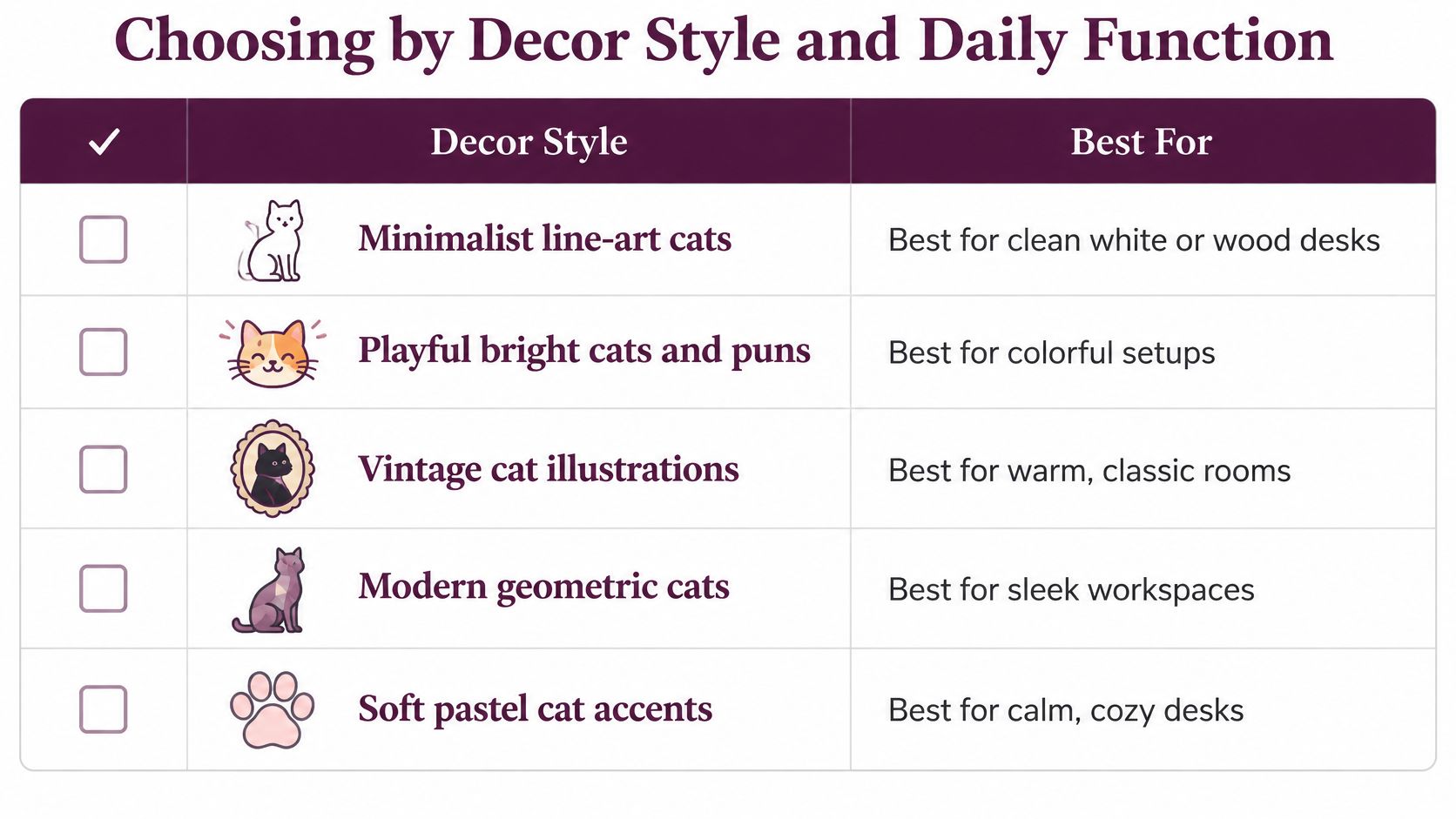
Make the style work for your day
Before buying, answer these questions:
- Daily use: Will you touch it throughout the workday, consult it occasionally, or enjoy looking at it?
- Available space: Can it occupy a permanent spot without displacing your notebook, mouse, or charging area?
- Cat interaction: Will your cat brush past it, investigate it with their mouth, or climb beside it?
- Budget: Are you paying for useful construction, or mostly for a coordinated appearance?
On a crowded desk, choose an accessory that replaces something you already use. Swap a plain mouse pad for a cat design rather than adding another freestanding object. If you have an empty display corner, a figurine makes more sense.
For visiting paws, prioritize washable fabric or sealed, wipeable surfaces over elaborate texture. Plush looks cozy, but loose fibers and deep seams demand more attention than smooth ceramic. A sleek metal accessory may clean easily yet need careful inspection around folded edges.
FloofChonk's themed tees, mugs, and desk décor can provide inspiration for a favorite cat motif. For coordination beyond the workstation, these cat home accessory ideas can help you connect the desk with the surrounding room.
Let a style guide your first purchase, not dictate the whole desk. You don't need cat ears on every object. Floofie recommends a modest starter set: one functional piece, one decorative piece, and one accent for the screen or cords. Keep the screen accent outside the display area, and choose a cord accent only if it secures cables rather than turning them into toys.
Sizing and Materials for Your Desk
Grab a tape measure, painter's tape, and a sheet of paper before opening product pages. Measure the desktop's width and depth, then mark the area you need for typing, mouse movement, and reading notes. That working zone stays clear, no matter how persuasive the little ceramic face looks. 🐈
Measure the footprint and the silhouette
- Map the usable space. Measure the free area between the monitor and the front desk edge. Place paper where the accessory would sit, then work around it before committing.
- Check height from your normal seated position. Figurines and calendars should sit below the monitor's top edge without covering the display; keep a lamp's shade outside the screen silhouette.
- Check balance, not just weight. Choose substantial bases for pen holders and lamps. Reserve light, hollow figurines for protected shelves away from edges and cat landing routes.
- Match the material to its task. Ceramic and steel suit stable bases; washable fabric suits mouse pads; smoothly finished wood or bamboo works well for shelves.
Product dimensions can be misleading when you look only at width. A cat pen holder may have a compact base but projecting ears, while a lamp's shade may extend beyond its stand. Compare the complete assembled dimensions with your paper template, including the space needed to operate switches or remove pens.
Practical fit test: If you have to lift an accessory every time you open a notebook, it hasn't earned that position.
Resin works for lightweight ornaments you can inspect for damage. Plush and felt belong in calm corners, away from loose cords and equipment vents. Don't assume a material guarantees stability: a broad base and sensible shape matter more than a heavy-sounding product description.
Floofie's verdict: a well-measured desk leaves room for work, and a nearby approved nap spot leaves room for the cat. 😸
Setting Up Your Desk Without Blocking the Screen
Set up the monitor before adding the cats. A cat-shaped shelf or monitor topper shouldn't decide your viewing position. If an accessory forces you to crane your neck, lean sideways, or peer around a silhouette, move the accessory.
This arrangement keeps feline flair outside your working sightline.
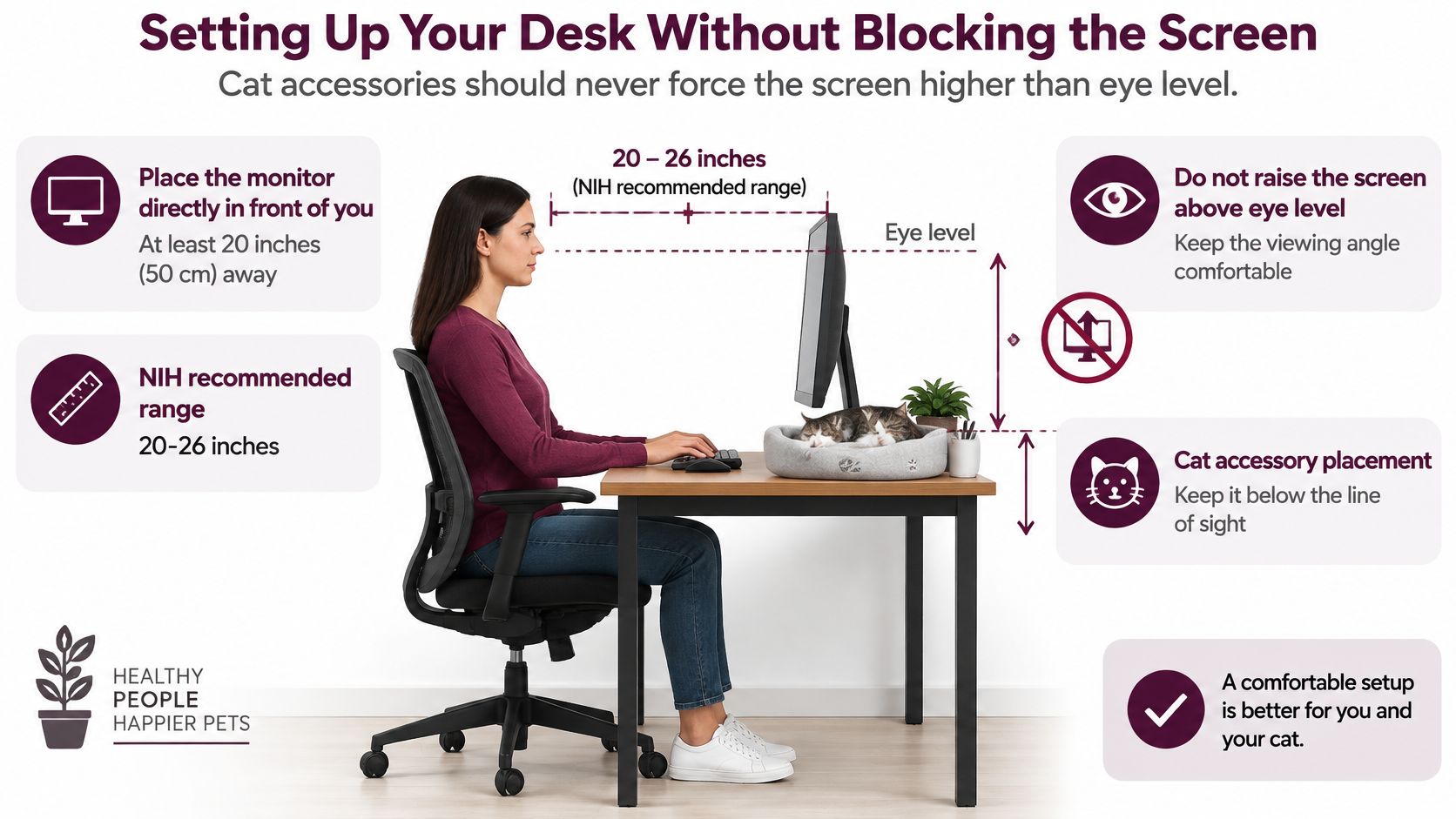
Set the display before decorating
- Place the monitor directly in front of you. The U.S. Occupational Safety and Health Administration's workstation guide recommends a viewing distance of at least 20 inches (50 cm) and placing the screen's top at or slightly below eye level; it also warns that an overly high monitor can cause backward head tilt and neck and shoulder fatigue. Center your main working display with your seated position, rather than shifting it aside to accommodate a lamp.
- Set the top edge before choosing a riser. Sit normally, relax your shoulders, and look ahead without lifting your chin. Adjust the display itself first, then decide whether anything beneath it would improve the setup.
- Control reflections before adding task lighting. NIH guidance summarized in the Office of Congressional Workplace Rights ergonomic guide recommends a monitor distance of approximately 20–26 inches, placement at right angles to windows, and a 10–20-degree backward tilt. After positioning the monitor, check the screen with your usual overhead lights switched on.
- Put the cat figurine or lamp outside the direct viewing path. Don't place a shiny ornament between the screen and a window, where it can add distracting reflections. Aim the lamp toward paper or the keyboard area, not toward the display.
When a monitor riser deserves its place
A riser is useful when it creates accessible storage and preserves a comfortable screen position. Slide a closed notebook or compact keyboard underneath, but keep the shelf's opening clear enough that retrieving items doesn't shake the display.
Say your monitor already sits comfortably on its original stand. Adding a decorative platform beneath it may create storage while making the viewing position worse. In that situation, choose a side organizer or a shelf that doesn't support the screen.
For a laptop setup, consider the whole arrangement rather than the cat-shaped stand alone. Raising the laptop may help screen placement, but you still need a comfortable way to use the keyboard and pointing device. Don't buy a riser that solves one position by making another awkward.
A monitor shelf is storage furniture, not permission to keep stacking upward.
Leave ventilation openings unobstructed, and make sure the stand's feet rest fully on the supporting surface. A shelf that barely accommodates the monitor base is a poor choice for a workspace that receives surprise paw inspections.
Finally, test the arrangement during an ordinary task. Read a document, switch windows, and reach for your notebook without moving your head around the décor. Floofie's rule is simple: bright eyes, not screen glare. ✨🐈
Cat-Safe Checks Before You Buy
Start with chewing cords. A cat-shaped cable clip isn't enough if the rest of the cable still hangs invitingly over the desk edge. Route the complete accessible length, secure the organizer, and inspect the cable where it enters and leaves the cover.
The same distinction applies across the desk: cat-themed isn't automatically cat-friendly. A human decoration may become a hazard when a cat paws it, mouths it, or sends it to the floor.
Cat-safety risks and what to check
| Risk | What to check | Red flag |
|---|---|---|
| Chewing cords | Cables sleeved or held in an organizer | Loose cords dangling over the desk edge |
| Tipping over | Weighted base and low center of gravity | Light hollow figurine with a narrow base |
| Small parts | Solid, glued-on pieces | Bells, beads or eyes a cat can pull off |
| Toxic finishes | Restricted-substance declarations covering lead and cadmium | No material information or unlabeled paint |
| Heat and batteries | Certified charger and cool shell in use | Hot-to-touch housing or swollen battery |
| Washability | Machine-washable or wipe-clean surface | Fabric that stains and cannot be cleaned |
Glued-on details still need inspection. Prefer a single-piece design where possible, and reject anything with an eye, bell, or decorative ear that shifts under gentle handling. Cable sleeves also need supervision: they reduce access, but they aren't a guarantee against determined chewing.
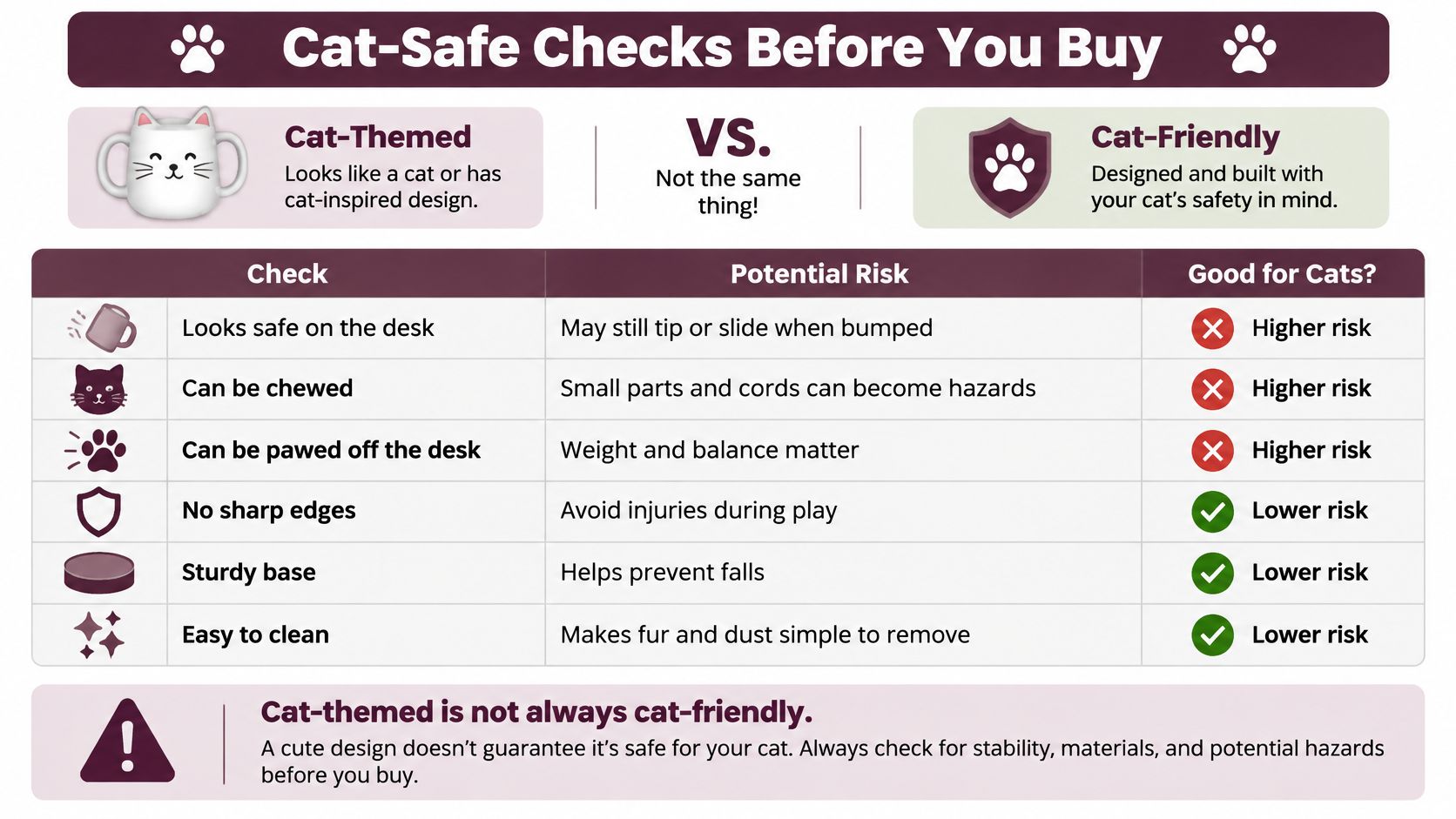
Ask for evidence, not a reassuring adjective
For items likely to meet paws or mouths, ask the seller about materials, restricted-substance testing, and detachable components. Eurofins' pet-product safety guidance identifies mechanical, chemical, electrical, thermal, and battery risks, alongside checks for sharp edges, small parts, stability, and foreseeable animal interaction.
For powered accessories, verify charger compatibility and keep vents exposed. Stop using an item with damaged insulation, unusual heating, or battery swelling. For persistent cable interest, use this practical guide to stopping cats from chewing cords.
Give your cat a better destination
A nearby perch or scratch station can be a better purchase than another desktop accessory. It gives your cat somewhere intentional to settle while leaving work equipment alone. The trade-off is floor space, installation, and ongoing checks of supports or fasteners.
Multi-cat households need separate options rather than a single coveted lookout: the American Pet Products Association's 2025 Dog & Cat Report announcement states that households with three or more cats increased 36% from 2018 to 2024.
Before paying, run this store-floor check:
- Press gently: Does the base rock or slide?
- Inspect closely: Can anything detach, chip, snag, or expose a sharp edge?
- Trace the power route: Can cords stay inaccessible without blocking ventilation?
- Confirm cleaning: Can you remove fur, dust, and spills without damaging the finish?
Materials and Care for Long-Lasting Pieces
Cleaning and care by material
| Material | Cleaning | Cat-safety note |
|---|---|---|
| Ceramic or porcelain | Wipe with a damp cloth or hand wash if suitable | Glazed surface resists chewing, but isn't chew-proof |
| Resin figurine | Mild soap and water, then dry fully | Check for cracks that expose sharp edges |
| Metal, including steel or brass | Wipe dry to prevent rust on susceptible parts | Check seams for sharp edges |
| Fabric mouse pad | Machine wash cold and air dry if labeled washable | Check stitching after washes |
| Wood or bamboo | Dust and wipe with a damp cloth, never soak | Sanded smooth finish is safer |
| Plush or felt | Spot clean and check for loose stuffing | Remove any piece a cat has begun to shred |
Clean for the construction, not just the main material. A ceramic pen holder may tolerate hand washing, but its glued felt feet might not. A fabric mouse pad may have a washable surface while its backing requires gentler treatment.
Glazed ceramic is easy to wipe, but remove chipped pieces immediately. Don't treat a hard surface as permission for chewing. Resin ornaments need similarly careful inspection around thin ears, tails, and projecting paws.
Keep finishes intact
Steel and brass aren't interchangeable for care. Dry steel carefully, particularly around joints, and avoid abrasive scrubbing that damages coatings. Brass may develop a patina; use a cleaner intended for its finish rather than reaching for a general-purpose polish.
For wood and bamboo, wring out the cloth before wiping and dry the surface afterward. Don't soak joints or leave water sitting beneath a mug-shaped pen cup. If the finish splinters or flakes, take the accessory out of use rather than leaving a rough edge within paw reach.
A mouse pad should lie flat after cleaning. Stop using it if the backing curls, the surface separates, or stitching loosens enough to catch claws. Plush and felt require the strictest judgment: visible stuffing or loose strips mean the piece leaves the shared workspace. No farewell paw-ty required. 🐾
Use a repeatable care routine
- Weekly dusting: Lift accessories and clean beneath them, including shelf corners where fur gathers.
- Monthly wiping: Clean handled surfaces and allow everything to dry before replacing pens or reconnecting power.
- Quarterly inspection: Check for cracks, loose details, worn bases, and frayed cords. Inspect sooner after a fall, spill, or chewing attempt.
Unplug powered items before cleaning, and apply cleaner to the cloth rather than spraying the accessory. Keep liquid away from switches, charging ports, and battery compartments.
Floofie's multi-cat rule: remove a damaged piece as soon as you notice a missing part, then find the detached part before another cat does. Replace the accessory only after you've dealt with the loose piece.
Pick Your First Cat Desk Accessory
Match the gift to the recipient's habits, not just their love of cats. The best present is something they'll use every day, with a design that makes them smile rather than rearrange their whole workstation.
- Remote worker: Choose a cable organizer for an untidy charging area. Add a monitor riser only if their current screen position and desk measurements justify it.
- Teacher: A stable cat pen holder and calendar suit marking, planning, and keeping frequently used supplies close.
- Gamer: Pick a non-slip cat mouse pad with a smooth, unobstructed tracking area. Skip raised decorative details where the mouse travels.
- Pet-loving colleague: Choose a compact, solid cat figurine that fits a shelf or desk corner without demanding maintenance.
Buy for the problem you actually have
For a cramped desk, a riser makes sense only when it creates usable storage without compromising the display position. If the monitor doesn't need lifting, buy a compact organizer instead. Extra height isn't automatically extra usefulness.
For cord chaos, choose cable management before décor. It's less glamorous than a glowing cat lamp, but reclaiming the charging area is a satisfying upgrade. Look for a design that suits the cable route, not merely the cable color.
For a simple everyday refresh, a mouse pad is the easiest starting point. You replace an existing object rather than introducing another footprint. Choose the artwork after you've checked the backing, edge finish, and cleaning method.
If the recipient writes constantly, cat notepads are another practical companion for a pen holder. Keep paper gifts separate from a cat's approved resting spot so the daily task list doesn't become bedding.
Gift-buyer shortcut: Choose the object you can already picture the recipient using on an ordinary workday.
Make the first purchase count
- Measure the desk. Record the available footprint and test the shape with paper before ordering.
- Pick a functional piece and a decorative companion from your starter set. You can buy them separately; a matching bundle isn't necessary.
- Apply the safety checks. Inspect construction, accessible cords, cleaning instructions, and any detachable details before keeping the item.
- Set the monitor at eye level, then place accessories around the finished working arrangement rather than rearranging yourself around them.
FloofChonk offers cat-themed desk décor and gifts for different styles, from playful accents to pieces that complement a quieter setup. Choose a design that feels like the recipient, not an entire coordinated desk they didn't ask for.
Floofie's sign-off: a cat-approved desk is a happy desk, so start with one useful piece today. Leave room for your work, give your cat a welcome spot nearby, and let the whiskered details provide the fun. 😺
FloofChonk offers cat-themed accessories, mugs, home décor, and gifts to help you add feline personality to your workspace. Visit FloofChonk with your desk measurements and a clear job in mind, then choose a piece that deserves its place beside your keyboard.